Highest possible sound quality, unrivalled interface workflow
Unrivalled sound and workflow
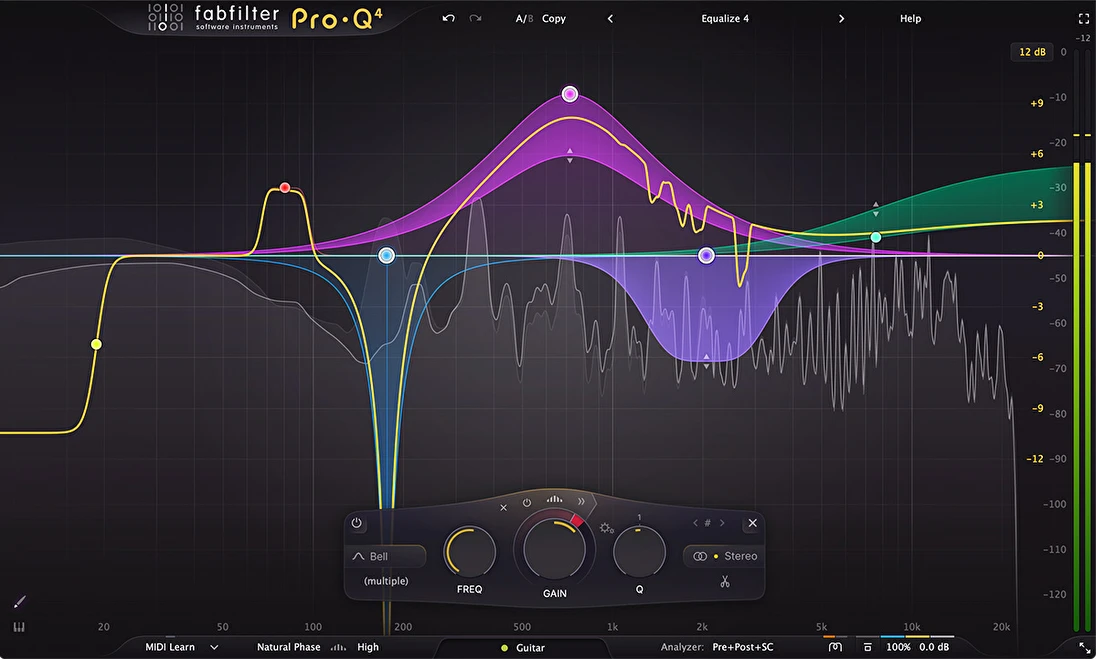
An equalizer is probably the tool you use most while mixing and mastering, so you need the best of the best. FabFilter Pro-Q 4 delivers with the highest possible sound quality, a very extensive feature set, and a gorgeous, innovative interface with unrivalled ease of use.
FabFilter Pro-Q 4 is designed to help you achieve your sound in the quickest way possible. Via the large interactive EQ display, you can add or sketch bands where you need them, enable dynamic EQ for any band, and select and edit multiple bands at once.
Of course, you also get all the usual FabFilter goodies: perfectly tuned knobs, interactive MIDI Learn, undo/redo and A/B switch, Smart Parameter Interpolation for smooth parameter transitions, an extensive help file with interactive help hints, sample-accurate automation, advanced optimization and much more.
Instance List
A modular channel strip
Control all of your Pro-Q 4, Pro-C 3, Pro-DS and Pro-G instances in one convienent overview, via the instance list in Pro-Q 4.
You will discover that the Instance List is a huge time-saver, making it much easier to dial in initial settings for all plug-ins when starting your mix session.
Spectral dynamics processing
Precise treatment of problem frequencies
In Spectral dynamics mode, Pro-Q 4 doesn’t change the gain of the whole band, but triggers per specific frequency within a band when it exceeds the threshold, leaving other frequencies untouched. This is a great way of treating varying problem frequencies.
Typically, you would need a separate and often complex plug-in for this type of processing, but Pro-Q 4 makes the process simple to use and easy to understand, as a natural extension of normal dynamic processing.
EQ Sketch and usability
Just draw the curve you need
Setting up initial EQ settings in an equalizer often involves adding a few general bands to get started, like a low cut filter, a few bell filters and a high shelf, creating a general starting point.
Wouldn’t it be great if you could draw that curve in one gesture? Well… now you can with EQ Sketch!
Key features
improved: Highest possible sound quality
Up to 24 EQ bands
improved: Optional Dynamic EQ mode for all bands (Bell and Shelf shapes), with adjustable attack and release, optional side-chain filtering and external triggering
new Advanced Spectral dynamics processing, to effectively and precisely treat problem frequencies in your audio